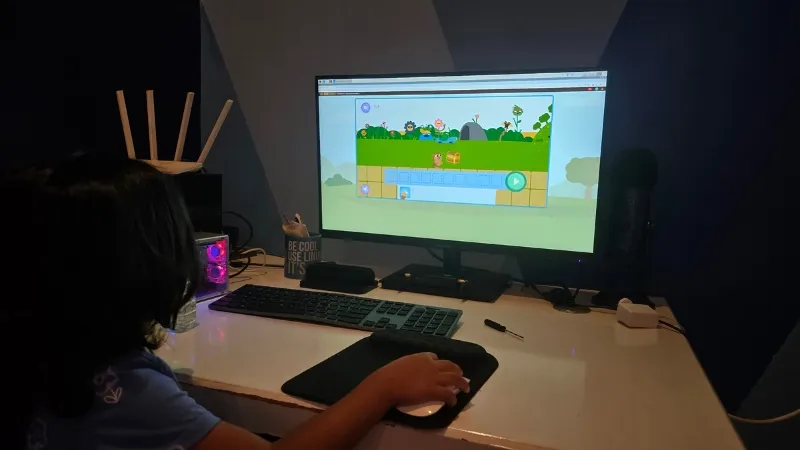
4 Ingenious Ways We’re Inspiring Our 4-Year-Old to Embrace Coding and Computer Literacy
The digital world is no longer a future concept; it’s our present reality. Equipping our children with the skills to navigate and even shape this reality is paramount. While it might seem early to introduce a four-year-old to coding, the foundational principles of computational thinking – problem-solving, logical reasoning, and creative expression – are beneficial at any age. We’ve embarked on a journey to cultivate these skills in our child, not by forcing complex programming languages, but by making learning fun, engaging, and age-appropriate. Here’s how we’re doing it, with concrete examples and practical tips you can apply at home.
1. Leveraging Playful Coding Apps and Games Designed for Preschoolers
The key to engaging a young child is making learning feel like play. Forget about lines of cryptic code for now. The digital marketplace is overflowing with intuitive, visually stimulating apps and games specifically designed to introduce coding concepts to preschoolers.
A. Exploring the World of Block-Based Programming with ScratchJr
ScratchJr, developed by MIT, is a fantastic starting point. It uses a block-based programming interface where children drag and drop colorful blocks representing different commands to animate characters, create stories, and build interactive games.
Detailed Point: The Power of Sequencing and Loops
ScratchJr brilliantly introduces fundamental programming concepts like sequencing (the order in which commands are executed) and loops (repeating a sequence of commands). We’ve used ScratchJr to create simple animations where our child makes a character move across the screen, change its appearance, and even make sounds. The visual nature of the blocks makes it easy for her to understand the cause-and-effect relationship between her actions and the on-screen results. We often narrate what she’s doing, explaining phrases like “First, the cat walks. Then, the cat meows,” to reinforce the idea of sequencing.
Detailed Point: Storytelling Through Code
Another engaging activity is creating interactive stories. We help her come up with a simple storyline – perhaps a bear going on a picnic. Then, using ScratchJr, she programs the bear to move to different locations, interact with objects like a basket and a sandwich, and even speak using pre-recorded sounds or text-to-speech features. This activity not only introduces coding concepts but also fosters creativity and storytelling skills.
B. Adventures in Logic with Thinkrolls Space
Thinkrolls Space is another excellent app that focuses on developing logical thinking and problem-solving skills, which are essential for coding. While it’s not strictly a coding app, it presents engaging puzzles that require children to think strategically and plan their moves.
Detailed Point: Problem-Solving Through Physics-Based Puzzles
The app presents a series of increasingly challenging puzzles where children must guide a Thinkroll character through obstacles by manipulating objects in the environment. They might need to use balloons to lift the character, springs to launch it over gaps, or fans to blow it in a specific direction. Each puzzle requires careful observation, planning, and experimentation, fostering crucial problem-solving skills.
Detailed Point: Collaboration and Guided Discovery
We often play Thinkrolls Space together, offering guidance and suggestions without directly solving the puzzles for her. We encourage her to try different approaches, experiment with the objects, and learn from her mistakes. This collaborative approach not only makes learning more fun but also helps her develop resilience and a growth mindset.
2. Unplugged Coding Activities: Bringing Computational Thinking to Life Offline
Coding isn’t just about sitting in front of a computer. Unplugged activities are a fantastic way to introduce coding concepts without any screens. These activities use physical objects and games to teach concepts like algorithms, sequencing, and debugging.
A. Creating Human Algorithms with Simple Chore Charts
One of the most effective unplugged activities we’ve implemented is creating simple chore charts. We break down everyday tasks, like making a sandwich or brushing teeth, into a sequence of smaller, more manageable steps.
Detailed Point: Deconstructing Tasks into Logical Steps
For example, making a sandwich might involve the following steps: 1. Get two slices of bread. 2. Open the peanut butter jar. 3. Spread peanut butter on one slice of bread. 4. Open the jelly jar. 5. Spread jelly on the other slice of bread. 6. Put the two slices of bread together. We then write these steps down on a chart, using simple pictures to help her understand each action.
Detailed Point: Debugging the “Program”
By following the chore chart, she learns to execute a sequence of instructions in the correct order. We also introduce the concept of debugging by intentionally making mistakes in the chart and asking her to identify and correct them. For example, we might switch steps 3 and 4, leading to a messy sandwich. This playful approach helps her understand the importance of accuracy and attention to detail, crucial skills in coding.
B. Directional Games: Navigating Mazes and Giving Instructions
Another engaging unplugged activity is playing directional games. We create simple mazes on paper or using masking tape on the floor and then give her instructions to navigate the maze.
Detailed Point: Introducing Cardinal Directions and Conditional Statements
We use cardinal directions (north, south, east, west) to give her instructions, such as “Move two steps north, then one step east.” As she becomes more proficient, we introduce conditional statements, such as “If you see a red line, turn right; otherwise, turn left.” This activity not only teaches her about directions and spatial reasoning but also introduces the concept of conditional logic, a fundamental element of programming.
Detailed Point: Role-Playing as the “Computer”
We also take turns being the “computer,” following her instructions to navigate the maze. This role-playing exercise helps her understand the importance of clear and precise instructions and reinforces the concept of algorithms as a set of well-defined steps.
3. Fostering Creativity with Digital Art and Animation Tools
While coding often focuses on logic and problem-solving, it’s also a powerful tool for creative expression. We encourage our child to explore her artistic side using digital art and animation tools.
A. Unleashing Artistic Expression with Drawing and Painting Apps
Numerous drawing and painting apps are available that allow children to create digital artwork using their fingers or a stylus. These apps often feature a wide range of brushes, colors, and special effects, allowing for endless creative possibilities.
Detailed Point: Experimenting with Different Mediums and Techniques
We encourage her to experiment with different brushes and colors, explore various techniques like blending and shading, and create her own unique masterpieces. We also introduce her to different art styles and artists, inspiring her to try new things and develop her own artistic voice.
Detailed Point: Connecting Art and Code through Interactive Elements
We sometimes combine digital art with basic coding concepts. For example, she might draw a picture of a character and then use ScratchJr to animate it, making it move, speak, or interact with other elements on the screen. This integration of art and code allows her to see how technology can be used to bring her creative visions to life.
B. Exploring the World of Animation with Stop-Motion Animation Apps
Stop-motion animation is a fun and engaging way to introduce the concept of animation. Using a tablet or smartphone and a stop-motion animation app, children can create short films by taking a series of photos of objects that are moved slightly between each shot.
Detailed Point: Understanding the Illusion of Movement
We’ve used stop-motion animation to create simple stories with LEGO bricks, Play-Doh figures, and even everyday objects. By taking a series of photos and then playing them back in sequence, she sees how a series of still images can create the illusion of movement.
Detailed Point: Developing Patience and Attention to Detail
Stop-motion animation requires patience and attention to detail, as even small movements can significantly impact the final result. This activity helps her develop these important skills while also fostering her creativity and storytelling abilities.
4. Integrating Coding Concepts into Everyday Activities and Conversations
The most effective way to make coding a natural part of a child’s life is to integrate coding concepts into everyday activities and conversations. This doesn’t require any special tools or programs; it simply involves being mindful of how we frame our questions and explanations.
A. Asking “What If” Questions to Encourage Hypothetical Thinking
We frequently ask “what if” questions to encourage hypothetical thinking and problem-solving. For example, “What if we didn’t have any peanut butter? What could we use instead?” or “What if the car wouldn’t start? How would we get to the park?”
Detailed Point: Exploring Different Scenarios and Solutions
These questions encourage her to think about different scenarios, consider possible solutions, and evaluate the consequences of each choice. This type of thinking is essential for coding, as programmers constantly need to anticipate potential problems and develop solutions in advance.
Detailed Point: Fostering Creativity and Adaptability
By encouraging her to explore different possibilities, we foster her creativity and adaptability, essential skills in a rapidly changing world. We also encourage her to ask her own “what if” questions, fostering her curiosity and independent thinking.
B. Talking About Algorithms in Simple Terms
We also talk about algorithms in simple terms, explaining that an algorithm is just a set of instructions for accomplishing a task. We use everyday examples, such as explaining the algorithm for making a peanut butter and jelly sandwich (as described earlier) or for getting ready for bed.
Detailed Point: Connecting Abstract Concepts to Real-World Examples
By connecting abstract concepts to real-world examples, we make them more concrete and accessible for a young child. We also use analogies to explain more complex concepts, such as comparing a computer program to a recipe or a set of driving directions.
Detailed Point: Building a Foundation for Future Learning
By introducing coding concepts in a fun and engaging way, we’re building a foundation for future learning. We’re not expecting her to become a professional programmer at age four, but we are hoping to instill a love of learning, a curiosity about technology, and a confidence in her ability to solve problems and create new things. We believe these skills will serve her well, no matter what path she chooses in life. Our website Tech Today also publishes the latest updates and trends in educational technologies.