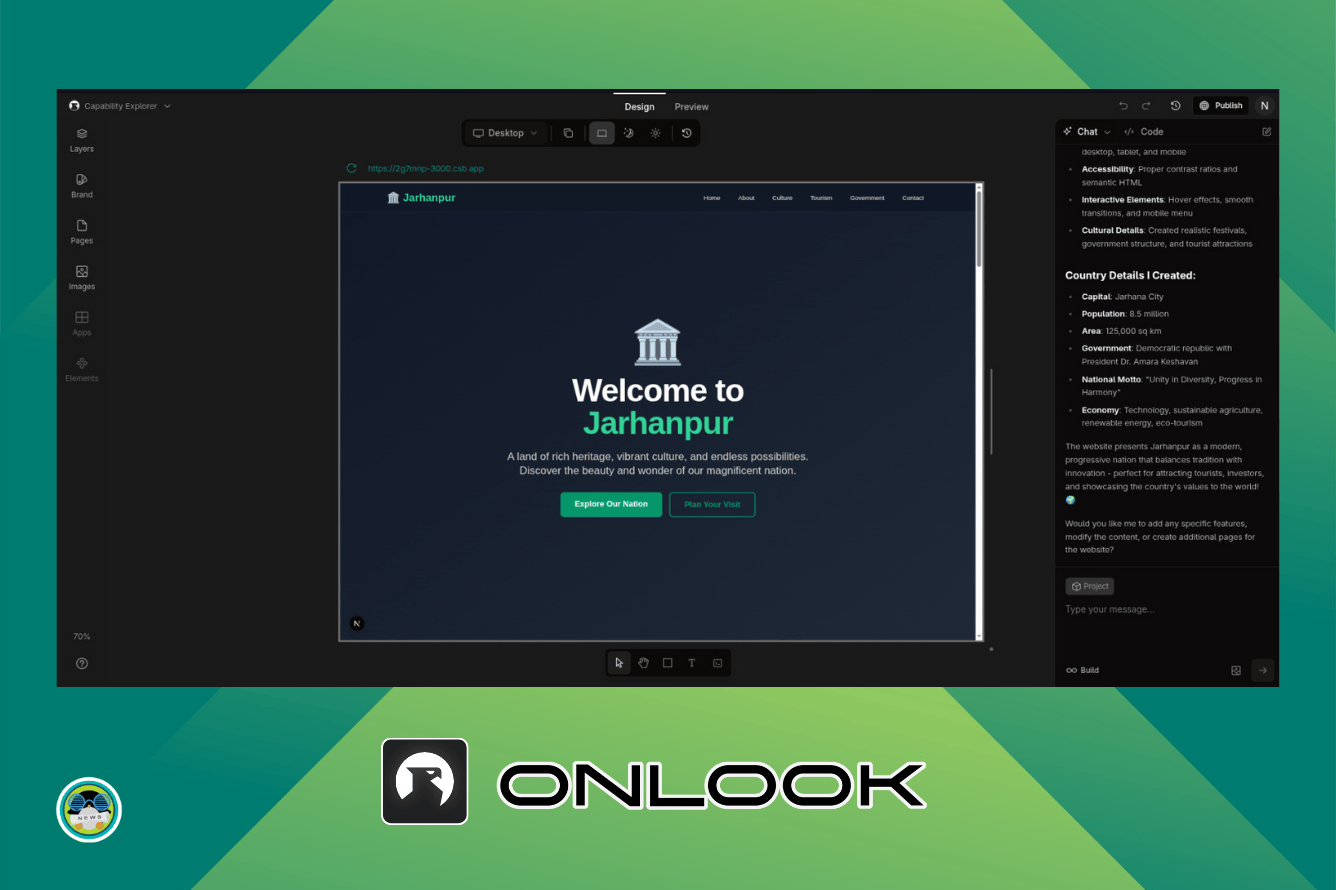
Hands-On with Onlook: The AI-Powered Visual Editor That Blends Code and Design
As technology continues to evolve, the lines between design and development are becoming increasingly blurred. At Tech Today, we constantly explore innovative tools that empower creators to seamlessly blend their artistic vision with robust functionality. Today, we delve into Onlook, a revolutionary AI-powered visual editor that promises to bridge the gap between code and design, enabling a more intuitive and efficient creative process. We will explain the tool, and provide a deep dive into its features, functionality and potential impact for both designers and developers.
Unveiling Onlook: A Paradigm Shift in Visual Editing
Onlook is not just another visual editor; it’s a sophisticated platform that leverages the power of Artificial Intelligence to augment the design and development workflow. It aims to facilitate a more intuitive and collaborative environment where designers can directly translate their creative ideas into functional code, and developers can easily visualize and modify complex projects.
Core Functionalities and Features
Onlook boasts a rich feature set designed to enhance both the design and development phases. The fundamental concept revolves around visual representation of code, streamlining the process and reducing the learning curve for new users.
- AI-Assisted Design: Onlook’s AI engine provides intelligent suggestions, anticipates design needs, and automates repetitive tasks. This drastically reduces the time spent on mundane aspects of the design process, allowing creators to focus on the more strategic and creative elements.
- Real-Time Code Generation: As designers manipulate elements within the visual interface, Onlook intelligently generates the corresponding code in real-time. This immediate feedback loop allows for quicker iteration and experimentation. The platform currently supports HTML, CSS, JavaScript and React, with plans for future expansion.
- Seamless Code Integration: Designers can import existing codebases into Onlook and visually modify them. The changes are reflected immediately in both the visual interface and the underlying code, ensuring consistency and collaboration.
- Intuitive Drag-and-Drop Interface: Onlook’s interface is built around a user-friendly drag-and-drop system, enabling designers to easily add, modify, and rearrange elements. This intuitive approach minimizes the learning curve and allows users to quickly grasp the platform’s capabilities.
- Component-Based Architecture: The platform encourages the use of a component-based architecture, promoting code reusability and maintainability. Designers can create custom components and reuse them across multiple projects, ensuring consistency and efficiency.
- Version Control Integration: Onlook seamlessly integrates with popular version control systems like Git, enabling teams to collaborate effectively and manage changes. This integration helps prevent conflicts and ensures that the project remains organized and easily trackable.
- Responsive Design Capabilities: Onlook allows designers to create responsive designs that adapt seamlessly to different screen sizes and devices. The platform includes a variety of tools for testing and optimizing designs for various breakpoints.
The Power of AI in Visual Editing
The integration of AI is what truly sets Onlook apart from other visual editors. The AI engine analyzes design patterns, anticipates user needs, and automates repetitive tasks, enabling designers to work faster and more efficiently.
Intelligent Suggestions and Automation
Onlook’s AI engine provides intelligent suggestions for design elements, color palettes, and layout options. It also automates tasks like image optimization, code generation, and responsive design adaptation.
- Smart Component Suggestions: Based on the current design context, Onlook’s AI suggests relevant components and design patterns. This feature helps designers discover new ideas and accelerate the design process.
- Automated Code Completion: As designers manipulate elements within the visual interface, Onlook’s AI automatically generates the corresponding code. This feature dramatically reduces the time spent on coding and helps prevent errors.
- Intelligent Layout Optimization: Onlook’s AI analyzes the design and suggests optimal layouts for different screen sizes and devices. This feature helps designers create responsive designs that look great on all platforms.
Personalized User Experience
The AI engine learns from user behavior and adapts to their individual preferences. This personalized experience ensures that Onlook becomes an increasingly valuable tool over time.
- Adaptive Interface: Onlook adapts its interface based on the user’s past actions and design preferences. This personalized experience makes the platform more intuitive and efficient.
- Customized Recommendations: The AI engine provides customized recommendations for design elements, components, and layout options based on the user’s design style.
Bridging the Gap Between Design and Development
Onlook aims to foster a more collaborative environment where designers and developers can work together seamlessly. The platform’s visual interface and real-time code generation capabilities make it easier for designers to understand and contribute to the development process.
Improved Collaboration
Onlook’s visual interface and real-time code generation capabilities make it easier for designers and developers to communicate and collaborate effectively.
- Shared Visual Language: Onlook provides a shared visual language that both designers and developers can understand. This helps bridge the gap between the two disciplines and promotes better communication.
- Real-Time Feedback: Designers can see the code generated in real-time as they manipulate elements within the visual interface. This immediate feedback loop allows for quicker iteration and experimentation.
- Direct Code Modification: Developers can directly modify the code within Onlook and see the changes reflected in the visual interface. This allows them to easily debug and optimize the design.
Enhanced Efficiency
Onlook streamlines the design and development workflow, enabling teams to deliver projects faster and more efficiently.
- Reduced Development Time: Onlook’s AI-assisted design and real-time code generation capabilities significantly reduce development time.
- Fewer Errors: The AI engine helps prevent errors by providing intelligent suggestions and automating repetitive tasks.
- Improved Code Quality: Onlook encourages the use of a component-based architecture, promoting code reusability and maintainability.
Hands-On Experience: A Step-by-Step Guide
To truly appreciate the capabilities of Onlook, let’s walk through a simplified example of creating a basic web page using the platform.
Creating a New Project
- Launch Onlook and create a new project. Select the desired project type (e.g., web application, mobile app).
- Choose a template or start with a blank canvas. For this example, we’ll start with a blank canvas.
Adding Elements
- Use the drag-and-drop interface to add elements to the canvas. Start with a basic structure: a header, a main content area, and a footer.
- Modify the properties of each element using the visual editor. Change the text, font, color, and size to match your desired design.
Leveraging AI Assistance
- Use Onlook’s AI engine to get suggestions for design elements and layout options.
- Experiment with different AI-generated design variations to find the perfect look for your web page.
Generating Code
- As you manipulate elements within the visual interface, Onlook automatically generates the corresponding code.
- Inspect the generated code to understand how the visual design translates into code.
Customizing Code
- If necessary, directly modify the code to fine-tune the design or add custom functionality.
- See the changes reflected in the visual interface in real-time.
Previewing and Testing
- Use Onlook’s preview mode to see how your web page looks on different screen sizes and devices.
- Test the responsiveness of the design and make adjustments as needed.
Use Cases and Applications
Onlook’s versatile capabilities make it applicable to a wide range of use cases and industries.
Web Development
Onlook can be used to create everything from simple landing pages to complex web applications. Its visual interface and real-time code generation capabilities make it an ideal tool for both front-end and back-end development.
- E-commerce Platforms: Create visually appealing and user-friendly e-commerce platforms with Onlook’s drag-and-drop interface and component-based architecture.
- Content Management Systems (CMS): Build custom CMS solutions that allow users to easily manage and update website content.
- Web Portals: Develop interactive web portals with personalized user experiences and dynamic content.
Mobile App Development
Onlook supports mobile app development for both iOS and Android platforms. Its responsive design capabilities and component-based architecture make it easy to create mobile apps that look and function great on all devices.
- Native Mobile Apps: Build native mobile apps with Onlook’s support for popular mobile development frameworks.
- Hybrid Mobile Apps: Create hybrid mobile apps that can be deployed on multiple platforms with a single codebase.
Prototyping and Wireframing
Onlook is an excellent tool for prototyping and wireframing. Its visual interface and drag-and-drop capabilities make it easy to quickly create interactive prototypes and wireframes.
- User Interface (UI) Design: Design intuitive and user-friendly interfaces for web and mobile applications.
- User Experience (UX) Design: Create seamless and engaging user experiences that meet the needs of your target audience.
Educational Purposes
Onlook can be used as an educational tool to teach design and development concepts. Its visual interface and real-time code generation capabilities make it easier for students to learn and understand the relationship between design and code.
- Coding Bootcamps: Onlook can be integrated into coding bootcamp curricula to teach students the fundamentals of web and mobile development.
- University Courses: Onlook can be used in university courses to teach students advanced design and development concepts.
The Future of Visual Editing with AI
Onlook represents a significant step forward in the evolution of visual editing. As AI technology continues to advance, we can expect to see even more powerful and intelligent visual editors emerge. At Tech Today, we believe that these tools will empower creators to bring their visions to life more easily and efficiently than ever before. The rise of AI-powered visual editors promises to revolutionize the design and development process, unlocking new levels of creativity and innovation. Onlook is at the forefront of this revolution, and we are excited to see how it will shape the future of visual editing.
Potential Future Enhancements
- Expanded AI Capabilities: We can anticipate even more sophisticated AI features, such as automated design optimization, personalized design recommendations, and intelligent code debugging.
- Broader Language Support: Future versions of Onlook could support a wider range of programming languages, making it applicable to an even broader range of projects.
- Integration with Other Tools: Seamless integration with other design and development tools, such as Adobe Creative Suite and project management platforms, would further enhance Onlook’s capabilities.
- Advanced Collaboration Features: Enhanced collaboration features, such as real-time co-editing and integrated communication tools, would make Onlook an even more valuable tool for teams.
In conclusion, Onlook is a powerful and innovative visual editor that seamlessly blends code and design. Its AI-powered features, intuitive interface, and versatile capabilities make it an ideal tool for both designers and developers. As technology continues to evolve, we believe that Onlook will play a significant role in shaping the future of visual editing.