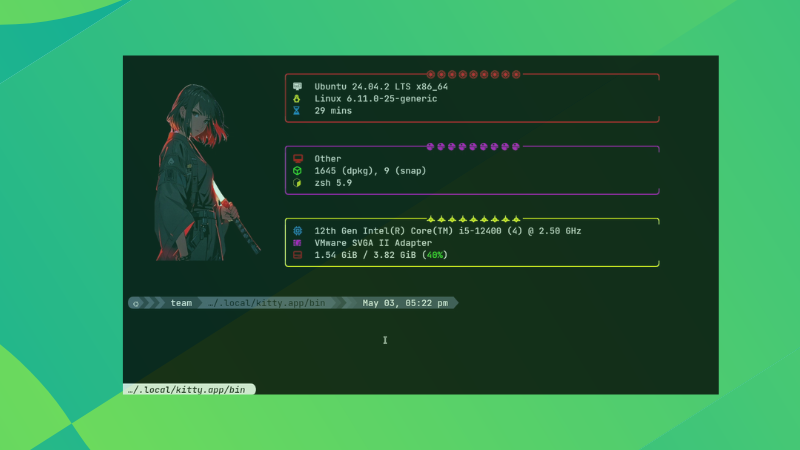
I Made Kitty Terminal Unbelievably Better: 15 Advanced Customization Tips and Tweaks
Kitty, the GPU-accelerated terminal emulator, is already a powerhouse for developers and power users. But its true potential lies in its deep customizability. At Tech Today, we believe in pushing the boundaries of what’s possible. That’s why we’ve compiled 15 advanced customization tips and tweaks to transform your Kitty terminal from great to unbelievably better. These aren’t just cosmetic changes; they’re about optimizing your workflow, boosting productivity, and creating a terminal environment perfectly tailored to your needs.
1. Mastering the Kitty Configuration File: Your Customization Command Center
The foundation of any Kitty customization lies in its configuration file, kitty.conf. Located by default at ~/.config/kitty/kitty.conf, this file is where you’ll define all your custom settings. We recommend backing up your existing configuration before making changes.
Understanding the Configuration Structure: The
kitty.conffile uses a simple key-value pair structure. Each line defines a setting, followed by its value. Comments are denoted by a#symbol at the beginning of the line. This simplicity makes it easy to understand and modify.Reloading the Configuration: After making changes to
kitty.conf, you need to reload the configuration for the changes to take effect. You can do this by pressingCtrl+Shift+F5within Kitty, or by running the commandkitty @ reloadin another terminal.
2. Unleashing Visual Appeal: Customizing Fonts for Readability and Style
Font selection is crucial for both readability and aesthetics. Kitty offers extensive font customization options.
- Setting the Primary Font: The
font_familysetting determines the primary font used in your terminal. We recommend using a monospaced font for optimal readability. Some popular choices include:Hack,Fira Code,JetBrains Mono, andIosevka. Experiment to find the font that best suits your eyes.
font_family Hack
- Font Size Adjustment: The
font_sizesetting controls the font size. A larger font size can improve readability, especially on high-resolution displays.
font_size 12.0
- Font Features and Ligatures: Kitty supports font features and ligatures, which can significantly enhance the visual appeal of your code. Ensure your chosen font supports ligatures, and enable them in your configuration:
font_features Hack +liga +dlig
- Font Kerning: This is a setting that can be added, and will control the space between characters in the fonts
font_kerning_strategy adjust-clusters
3. Color Schemes: Setting the Mood and Reducing Eye Strain
Colors play a vital role in the terminal experience. Kitty allows you to customize the entire color palette.
- Built-in Color Schemes: Kitty comes with several built-in color schemes. You can easily switch between them using the
color_schemesetting.
color_scheme dracula
- Custom Color Definitions: For ultimate control, you can define your own custom color scheme. This involves setting the colors for the background, foreground, and various ANSI color codes. This requires a deep understanding of color codes, but is very useful to get the color you are wanting.
background #282a36
foreground #f8f8f2
color0 #282a36
color1 #ff5555
color2 #50fa7b
color3 #f1fa8c
color4 #bd93f9
color5 #ff79c6
color6 #6272a4
color7 #f8f8f2
color8 #44475a
color9 #ff5555
color10 #50fa7b
color11 #f1fa8c
color12 #bd93f9
color13 #ff79c6
color14 #6272a4
color15 #ffffff
- Transparency and Opacity: Kitty supports transparency, allowing you to see through the terminal window. The
background_opacitysetting controls the level of transparency. Set this to 1.0 for no transparency
background_opacity 0.9
4. Keyboard Shortcuts: Mastering Efficiency with Custom Bindings
Keyboard shortcuts are essential for efficient terminal usage. Kitty offers a powerful system for defining custom keybindings.
- Defining Keybindings: Keybindings are defined using the
mapdirective inkitty.conf. The syntax ismap key action. For example, to open a new window withCtrl+Shift+T, you would use the following:
map ctrl+shift+t new_window
Common Keybinding Examples:
map ctrl+shift+n new_os_window: Opens a new OS window.map ctrl+shift+w close_window: Closes the current window.map ctrl+shift+r reload_config: Reloads the Kitty configuration.map ctrl+shift+left previous_window: Focuses the previous window.map ctrl+shift+right next_window: Focuses the next window.map ctrl+shift+page_up scroll_page_up: Scrolls up one page.map ctrl+shift+page_down scroll_page_down: Scrolls down one page.
Custom Action Chains: Keybindings can trigger complex action chains. For example, you can create a keybinding to run a specific command in a new window:
map ctrl+shift+x new_window bash -c 'command_to_run'
5. Mouse Actions: Expanding Interaction Beyond the Keyboard
Kitty allows you to define custom actions for mouse clicks and gestures.
- Mouse Click Actions: You can define actions for single clicks, double clicks, and triple clicks.
mouse_map left press ungrabbed,move_window
- Scrolling Actions: Customize scrolling behavior with the
wheel_scroll_multipliersetting.
wheel_scroll_multiplier 5.0
6. Window Management: Tiling and Layout Customization for a Productive Workspace
Kitty’s window management capabilities can be significantly enhanced through customization.
- Window Borders: Customize the appearance of window borders with the
window_margin_widthandwindow_padding_widthsettings.
window_margin_width 5
window_padding_width 5
Automatic Tiling: While Kitty doesn’t have built-in tiling, you can achieve similar functionality using external tools like
tmuxorzellijcombined with custom keybindings to manage window sizes and positions.Focus Management: Tweak how Kitty handles window focus with settings like
focus_follows_mouseandenable_mouse_moves.
focus_follows_mouse yes
enable_mouse_moves yes
7. Tabs and Windows: Organizing Your Terminal Sessions Effectively
Customize the appearance and behavior of tabs and windows.
- Tab Bar Style: Control the appearance of the tab bar with the
tab_bar_stylesetting. Options includefade,separator, andpowerline.
tab_bar_style powerline
- Tab Title Template: Customize the tab title using the
tab_title_templatesetting. You can include variables like the current working directory and the process name.
tab_title_template "{title}"
- Window Titles: Manage window titles dynamically using shell integration or by setting them manually with escape sequences.
8. Bell Behavior: Customizing Notifications
Control how Kitty handles terminal bells.
- Visual Bell: Enable or disable the visual bell with the
visual_bell_durationsetting. A value of0disables the visual bell.
visual_bell_duration 0.0
- Audio Bell: Customize the audio bell with the
enable_audio_bellsetting.
enable_audio_bell no
9. Performance Tuning: Optimizing Kitty for Speed
Optimize Kitty for maximum performance.
GPU Acceleration: Ensure GPU acceleration is enabled for smooth rendering.
Asynchronous Rendering: Enable asynchronous rendering with the
async_renderingsetting.
async_rendering yes
- Adjusting the Update Delay: Setting
repaint_delayto a lower value makes the rendering of the terminal faster.
repaint_delay            10
input_delay              3
10. Shell Integration: Bridging the Gap Between Terminal and Shell
Kitty offers seamless shell integration, enabling advanced features like dynamic window titles and command execution hooks.
Zsh Integration: If you use Zsh, you can use Oh My Zsh, that makes it even easier.
Bash Integration: Enable Bash integration by sourcing the
kitty.bashscript in your.bashrcfile.
11. Advanced Graphics: Displaying Images and Unicode Characters
Kitty supports displaying images directly in the terminal.
Image Protocol: Kitty uses its own image protocol, which is efficient and supports a wide range of image formats.
Unicode Support: Kitty has excellent Unicode support, allowing you to display a wide range of characters, including emojis.
12. Custom Status Line: Displaying Relevant Information at a Glance
Create a custom status line to display relevant information, such as CPU usage, memory usage, and network status.
Using External Tools: You can use external tools like
tmuxorzellijto create a status line and integrate it with Kitty.Displaying System Information: Use commands like
top,htop, anddfto gather system information and display it in the status line.
13. Configuring Specific Programs: Optimizing Individual Workflows
Customize Kitty’s behavior for specific programs.
- Conditional Configuration: Use conditional configuration blocks in
kitty.confto apply settings only when a specific program is running.
[program:vim]
font_family Hack
font_size 13.0
- Environment Variables: Use environment variables to customize Kitty’s behavior based on the environment in which it is running.
14. Themes: Switching Styles with Ease
Easily switch between different themes for different moods or environments.
Creating Theme Files: Create separate theme files containing color scheme and font settings.
Switching Themes with Keybindings: Define keybindings to switch between different theme files.
15. The Power of Extensions: Enhancing Kitty’s Functionality Even Further
Explore and utilize Kitty extensions to add even more functionality.
Official Extensions: Kitty has a growing ecosystem of official extensions, which can be found on the Kitty website.
Community Extensions: The Kitty community has created a wide range of extensions, which can be found on GitHub and other code repositories.
By implementing these 15 advanced customization tips and tweaks, you can transform your Kitty terminal into a powerful and personalized tool that significantly enhances your productivity and coding experience. At Tech Today, we’re committed to providing you with the knowledge and resources you need to master your development environment. Embrace the power of Kitty’s customizability and unlock its full potential!