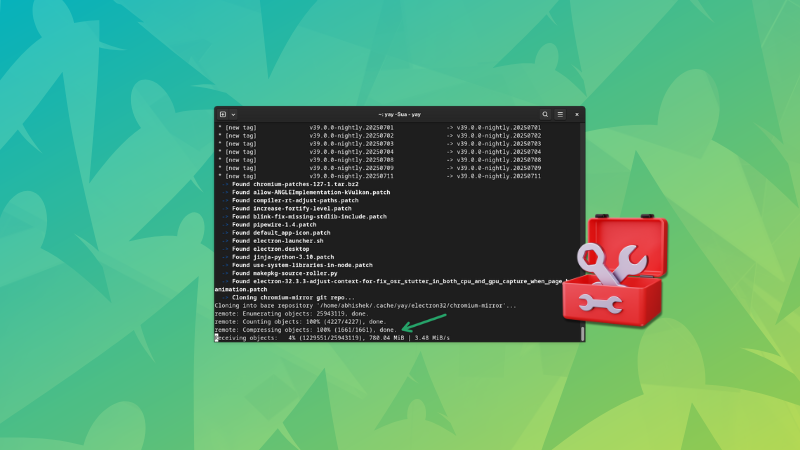
The Curious Case of AUR Updates Fetching 30 GB of Data for Electron-Based Applications
At Tech Today, we understand the frustration of encountering unexpectedly large updates, especially when dealing with applications built on Electron. Nothing is more jarring than initiating a routine system update and discovering that you need to download tens of gigabytes of data, seemingly out of nowhere. This article delves into the common causes behind this phenomenon specifically relating to the Arch User Repository (AUR) and Electron applications, offering practical solutions and strategies to mitigate these massive data fetches. We will explore the underlying technical reasons, common pitfalls in AUR package management, and ways to optimize your update process to save time and bandwidth.
Understanding the Root Causes of Large AUR Updates
Before diving into specific solutions, it’s crucial to understand why these inflated update sizes occur in the first place. Several factors contribute to this issue, often intertwined and compounding the problem.
Electron’s Bulky Dependencies
Electron, a popular framework for building cross-platform desktop applications using web technologies, relies on a significant number of dependencies. Each Electron application essentially ships with its own bundled version of Chromium, Node.js, and a vast ecosystem of JavaScript libraries. This means that even minor updates to Electron or its core components can translate to substantial data transfers. When an AUR package that depends on Electron is updated, the entire bundled Chromium and Node.js environment might need to be replaced, leading to a hefty download size. The Chromium browser’s frequent release cycle also contributes to this issue, as security patches and feature updates are constantly being incorporated into Electron, driving up the size of updates.
Inefficient Packaging Practices in AUR
The AUR is a community-driven repository, and while it offers a wealth of software not found in the official Arch Linux repositories, the quality of packaging can vary significantly. Some AUR packages might not be optimized for incremental updates, meaning that instead of downloading only the changed files, the entire application package is downloaded and rebuilt. This can occur when the package maintainer does not properly utilize tools like makepkg to create delta packages or when the package build process is inherently inefficient. Furthermore, some AUR packages may include unnecessary files, such as debugging symbols or pre-built binaries that are not required for end-users. These inefficiencies contribute to the overall size of the downloaded updates.
Frequent Updates and Version Bumping
Electron applications, due to their reliance on web technologies, are subject to frequent updates to address security vulnerabilities and compatibility issues. This constant cycle of updates, while necessary, can result in a continuous stream of large downloads, particularly if the application maintainer aggressively bumps the version number with each minor change. If an application has many dependencies that are also frequently updated, the cumulative effect can lead to unexpectedly large updates being necessary.
Dependency Conflicts and Rebuilds
Arch Linux is a rolling-release distribution, meaning that packages are constantly updated to their latest versions. This can sometimes lead to dependency conflicts, where an update to one package requires other packages to be rebuilt. When an Electron-based AUR package is involved, these rebuilds can trigger the download of large dependencies, even if the application itself hasn’t changed significantly. Orphaned packages, those without a current maintainer, can also contribute to dependency issues. When these packages are eventually picked up and updated, they may require significant changes to their dependencies, resulting in large update sizes.
Strategies for Mitigating Large AUR Updates
Now that we understand the common causes, let’s explore practical strategies for mitigating these massive data fetches when updating Electron-based applications through the AUR.
Choosing Optimized AUR Helpers
Not all AUR helpers are created equal. Some helpers are more efficient at handling dependencies and managing updates than others. Consider using AUR helpers like yay or paru, which are known for their advanced dependency resolution and delta package support. These helpers can often reduce the size of updates by only downloading the changed files, rather than the entire package. Furthermore, these helpers often offer features such as conflict resolution and package cleanup, which can help to prevent unnecessary rebuilds and reduce the overall size of updates. When choosing an AUR helper, be sure to read the documentation and understand its features and capabilities.
Implementing Partial Upgrades with Caution
While Arch Linux generally discourages partial upgrades (updating only some packages while leaving others behind), in certain situations, it might be tempting to selectively update packages to avoid large downloads. However, we strongly advise against this practice, as it can lead to dependency conflicts and system instability. Partial upgrades can break application functionality and even render your system unusable. Instead of partial upgrades, focus on optimizing your update process and addressing the underlying causes of large downloads. If you absolutely must perform a partial upgrade, be sure to thoroughly research the potential consequences and back up your system beforehand.
Pinning Package Versions (Use with Extreme Caution)
Pinning package versions, which involves preventing specific packages from being updated, is another strategy that can be used to avoid large downloads. However, this approach should be used with extreme caution, as it can create long-term dependency issues and security vulnerabilities. By pinning a package, you are essentially freezing its dependencies, which can lead to conflicts with other packages that require newer versions of those dependencies. Furthermore, pinned packages will not receive security updates, which can leave your system vulnerable to exploits. If you choose to pin a package, be sure to monitor its status regularly and unpin it as soon as possible to ensure that your system remains secure and up-to-date.
Cleaning the Package Cache Regularly
The package cache, located in /var/cache/pacman/pkg/, stores downloaded packages. Over time, this cache can accumulate a significant amount of data, especially if you frequently update your system. Regularly cleaning the package cache can free up disk space and improve the performance of your update process. You can use the command pacman -Sc to remove all uninstalled packages from the cache or pacman -Scc to remove all packages, including those that are currently installed. Be aware that cleaning the cache will require you to re-download packages if you need to reinstall them in the future.
Monitoring AUR Package Sources and Build Scripts
Before updating an AUR package, it’s always a good idea to examine the package’s source files and build scripts (PKGBUILD) for any unusual or suspicious activity. This can help you identify potential issues that might be contributing to the large size of updates, such as the inclusion of unnecessary files or inefficient build processes. You can also check the comments on the AUR package page to see if other users have reported similar issues or have suggested solutions. By monitoring the package sources and build scripts, you can gain a better understanding of what is being updated and how it is being built.
Consider Alternatives to Electron-Based Applications
While Electron offers many advantages for developers, its inherent bloat can be a significant drawback for users. Whenever possible, consider using native applications or lightweight alternatives to Electron-based applications. Native applications are typically smaller and more efficient than Electron applications, as they are built specifically for the target platform. Lightweight alternatives may offer similar functionality with a smaller footprint. By reducing your reliance on Electron applications, you can significantly reduce the size and frequency of updates.
Advanced Techniques for Optimizing AUR Updates
For advanced users, there are several more sophisticated techniques that can be used to further optimize AUR updates.
Using a Local Repository Mirror
Setting up a local repository mirror can significantly speed up updates by caching packages locally. This is particularly useful if you have multiple Arch Linux systems on your network, as each system can then download packages from the local mirror instead of from the internet. To set up a local repository mirror, you can use tools like arch-mirrorlist or reflector to generate a list of the fastest mirrors in your area and then configure your pacman.conf file to use those mirrors. Be sure to update your local repository mirror regularly to ensure that you are always using the latest packages.
Contributing to AUR Package Optimization
If you are comfortable with Linux packaging and the AUR ecosystem, consider contributing to the optimization of AUR packages. This can involve submitting patches to fix inefficient build processes, removing unnecessary files, or suggesting improvements to the package maintainer. By contributing to the AUR community, you can help to improve the overall quality of the AUR and reduce the size of updates for all users. You can submit patches or suggestions through the AUR package page or by contacting the package maintainer directly.
Analyzing Network Traffic during Updates
Using network monitoring tools like tcpdump or Wireshark can provide valuable insights into the update process. By analyzing the network traffic, you can identify which packages are being downloaded, how much data is being transferred, and where the data is coming from. This information can help you identify bottlenecks and optimize your network configuration. For example, you might discover that you are downloading packages from a slow or unreliable mirror, or that your internet connection is the limiting factor.
Reporting Issues to AUR Package Maintainers
If you encounter a package with an unusually large update size or other issues, be sure to report it to the package maintainer. Providing detailed information about the issue, such as the package version, the steps to reproduce the problem, and any error messages, can help the maintainer to diagnose and fix the problem. You can report issues through the AUR package page or by contacting the maintainer directly. The AUR community relies on user feedback to improve the quality of packages, so your contributions can make a significant difference.
Conclusion: Taking Control of Your AUR Updates
Dealing with unexpectedly large AUR updates, especially those involving Electron-based applications, can be a frustrating experience. However, by understanding the underlying causes and implementing the strategies outlined in this article, you can take control of your update process and minimize the impact of these massive data fetches. From choosing optimized AUR helpers to contributing to package optimization, there are many steps you can take to improve the efficiency of your Arch Linux system. At Tech Today, we are committed to providing you with the knowledge and tools you need to get the most out of your Linux experience. Remember to always prioritize security, stability, and community collaboration when managing your AUR packages.